How to Count Calories From a Photo — and Get Numbers You Can Trust
By Kaelo TeamUpdated
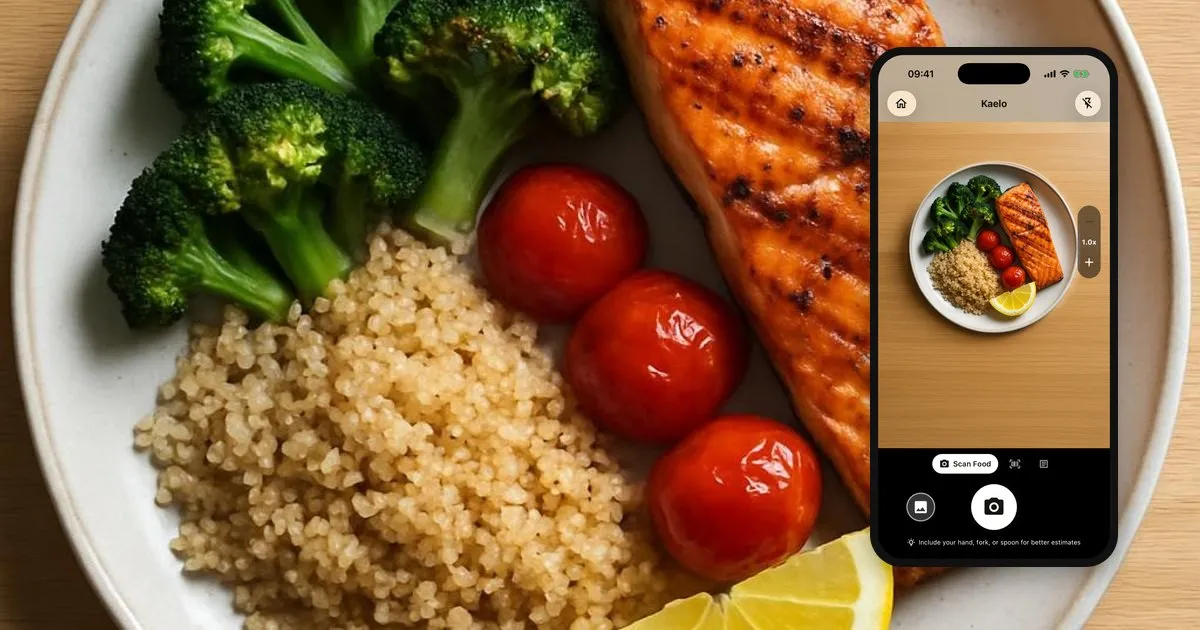
You can count calories from a photo with an AI calorie tracker: take a picture of your meal, the app identifies each food, estimates the portion, and looks up calories and macros. It takes seconds instead of minutes. The catch is portions and hidden fats — photo estimates tend to run low, so the habit that matters most is checking the portion before you save.
 Download Kaelo
iPhone and Android. Snap a meal, get calories and macros in seconds. Free trial on the yearly plan.
On your computer?Point your phone's camera at the code to install Kaelo.
How photo calorie counting works
Every photo calorie app does the same four jobs, in this order:
- Recognise the foods. An image model labels what it sees: "grilled chicken breast, white rice, broccoli".
- Estimate the portion. It judges how much of each food is on the plate from the size of the food relative to the plate, utensils and the rest of the scene.
- Look up nutrition. Each food and amount is matched to a food database (Kaelo uses USDA FoodData Central data) to get calories, protein, carbs and fat.
- Log it. The meal lands in your diary with a total and a breakdown per item.
Step 2 is where nearly all the error comes from. A model can be confident it's looking at rice and still be 50% off on how much rice.
Step by step: logging a meal from a photo
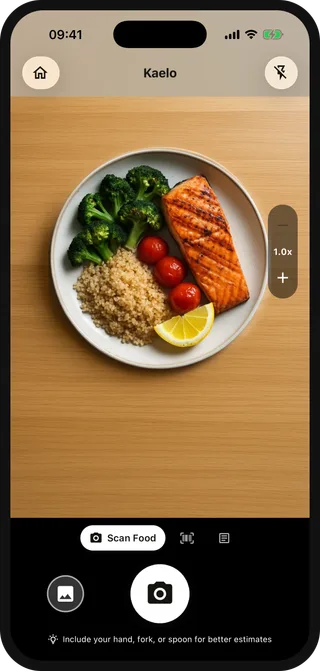
- Shoot from slightly above, about 45°, with the whole plate in frame. Straight-down shots flatten height; side shots hide what's behind.
- Use good light. Daylight or a bright kitchen light. Dark photos make sauces and oils invisible.
- Separate what you can. If the sauce comes on the side, photograph it on the side.
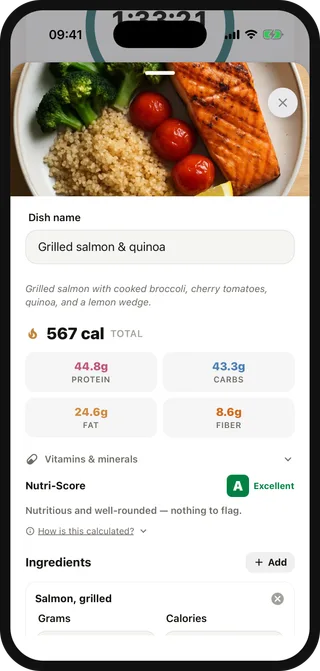
- Check the items. Make sure each food was recognised correctly — "brown rice" vs "fried rice" is a big calorie difference.
- Check the portions. This is the habit that matters most. In Kaelo you can tap an item and correct the amount in grams.
- Add what the camera can't see. Cooking oil, butter, dressing, sugar in coffee. One tablespoon of oil is about 120 kcal.
Where photo estimates go wrong (and how to fix each)
| Problem | Why it happens | Fix |
|---|---|---|
| Hidden fat | Oil and butter are absorbed or invisible | Add oil manually: 1 tbsp ≈ 120 kcal |
| Deep bowls | Depth isn't visible from above | Note the bowl size; correct grams |
| Mixed dishes | Ingredients overlap | Log the main components separately |
| Drinks | Milk, sugar and syrups look like water | Log drinks as their own item |
| Restaurant portions | Bigger than home portions | Bump the portion up, not down |
The pattern matters: the 2026 NIH test found apps under-counted meals by roughly 250–345 calories, with fat under-estimated by about 30 g per meal. So when unsure, round up.
Is it more accurate than manual logging?
Not automatically — but manual logging isn't as accurate as people assume either. In a well-known 1992 study, people who reported eating very little were, on average, eating about twice what they wrote down. Both methods miss oils, snacks and portion size.
What photo logging wins on is consistency. A log you keep for three months beats a perfect log you abandon after a week, and a photo takes seconds. The practical approach:
- Use the photo for speed.
- Correct the portion for the calorie-dense part of the meal (rice, pasta, meat, cheese, oil).
- Weigh those foods occasionally to calibrate your eye.
Which meals photograph well
Easy: a plate with separate items (protein + carb + vegetables), fruit, packaged snacks, sandwiches, salads with dressing on the side.
Harder: soups and curries, layered bowls, fried foods, smoothies, anything homemade with a lot of oil. For these, photograph the components while cooking, or log the recipe once and reuse it.
Make it a habit
Snap the photo before you eat — after is too late to see the portion. Then use your log to answer one question a week: am I in the deficit (or surplus) I planned? Pair it with your target from the TDEE calculator, and photo logging becomes the fastest way to stay honest with your goal.
Sources
Frequently asked questions
Can an app really count calories from a picture?
Yes. Photo calorie apps use image recognition to identify foods and estimate portion sizes, then look up nutrition values in a food database. The result is an estimate — good enough to track trends, and much better when you correct the portion for calorie-dense foods.
How accurate are photo calorie counters?
In a 2026 NIH test presented at the NUTRITION 2026 conference, four popular apps under-counted meals by about 250–345 calories on average, mostly because they missed fat. Carbohydrate estimates were more consistent. Adjusting portions and adding oils manually closes most of that gap.
Is there a free app that counts calories from photos?
Several apps offer photo logging, but most keep unlimited AI scanning behind a subscription — Cal AI's App Store listing, for example, says food scanning results require one. Kaelo also requires a subscription and has a free trial on the yearly plan.
What foods are hardest to estimate from a photo?
Mixed dishes (curries, stews, casseroles), anything fried or cooked in oil, sauces and dressings, drinks with milk or sugar, and foods hidden under other foods, like rice under a stir-fry. Single, separate foods on a plate are easiest.
Should I still use a food scale?
For a few calorie-dense items — oils, nut butters, cheese, rice and pasta — weighing occasionally teaches you what a portion looks like, and makes your photo logs more accurate. You don't need to weigh everything.
Log your next meal in seconds
Download KaeloiPhone and Android. Snap a meal, get calories and macros in seconds. Free trial on the yearly plan.
On your computer?Point your phone's camera at the code to install Kaelo.