Skip to content
AI-Powered Nutrition Tracking

Track your calories with just a picture

Snap a photo of any meal and get instant, accurate nutrition data powered by AI. No manual logging. No guesswork. Just results.

4.9 rating·Free to download
Download on the App StoreGet it on Google Play

Free 7-day trial · then from €2.91/month · Cancel anytime

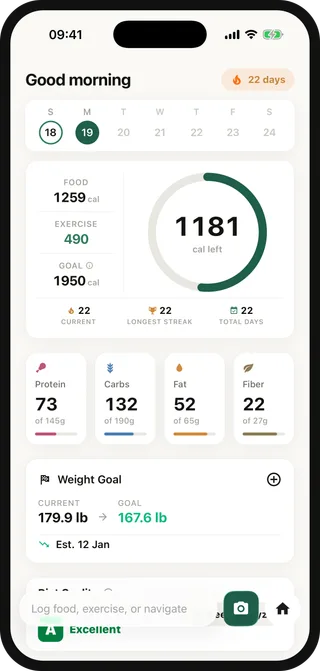
Kaelo dashboard with calories left, exercise, macros, streak and weight goal
Nutrition data powered by🏛️ USDA FoodData Central60,000+ verified foods

Features

What does Kaelo include?

Everything you need to eat better — in one app.

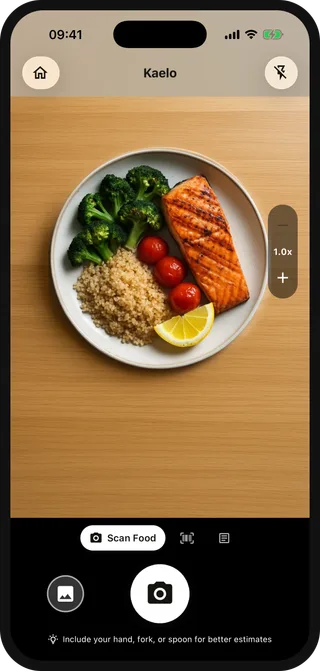
Kaelo camera framing a plate of food to scan
📸 AI Scan

Track food with just a photo

Snap any meal and the AI identifies each food, estimates the portion and logs calories, protein, carbs and fat. Check the grams before you save.

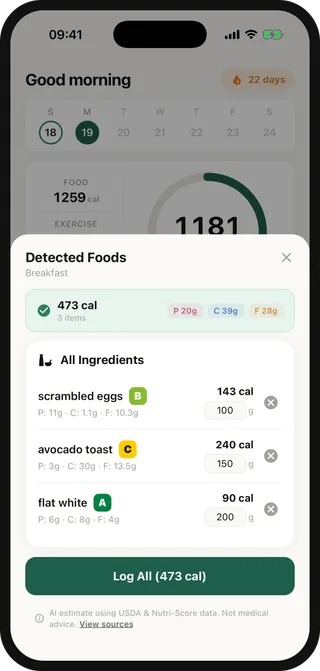
Kaelo detected foods from a typed breakfast: scrambled eggs, avocado toast and a flat white, 473 calories
💬 Just type it

Or describe it in plain words

Type “2 scrambled eggs, avocado toast and a flat white” and Kaelo splits it into foods with calories, macros and a Nutri-Score for each.

Kaelo dashboard with calories left, exercise, macros, streak and weight goal
🎯 Daily Dashboard

Your day at a glance

Calories left, exercise, protein, carbs, fat and fibre, your streak and your weight goal in one view. Targets come from your body stats, goal and activity.

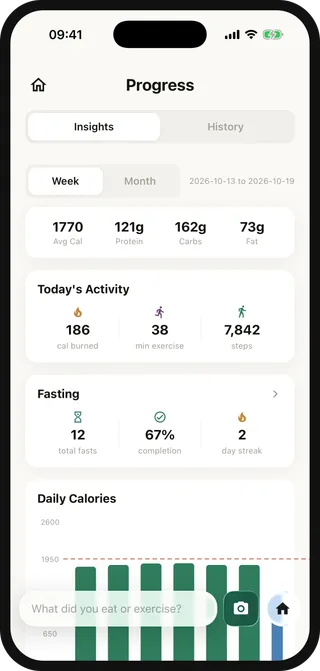
Kaelo progress screen with weekly averages, activity, fasting stats and a daily calorie chart
📈 Insights

See your patterns, not just the numbers

Weekly and monthly averages for calories and macros, activity, fasting completion and a daily calorie chart against your goal.

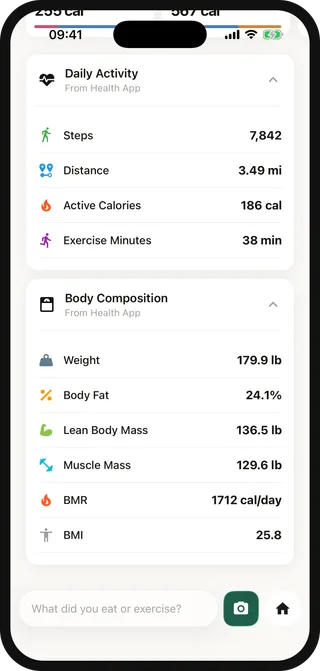
Kaelo activity screen with steps, distance, active calories and exercise minutes from Apple Health
❤️ Health Integrations

Apple Health & Health Connect, finally useful

Steps, distance, active calories and exercise minutes come in automatically from Apple Health or Health Connect, without double-counting your Watch and phone.

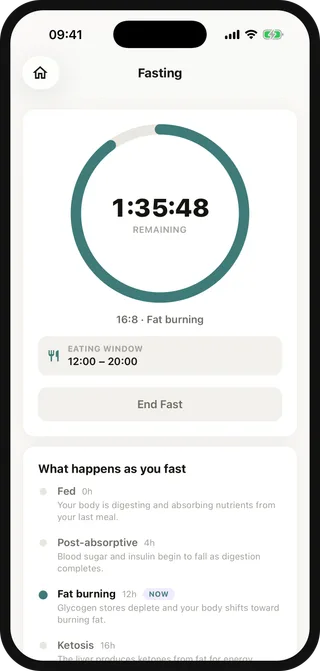
Kaelo fasting timer counting down a 16:8 fast with a 12:00 to 20:00 eating window
⏱️ Intermittent Fasting

Fasting timer built in

16:8, 18:6, 20:4, OMAD, 5:2 or a custom fast, with a countdown, your eating window and your fasting history next to your meals.

Trusted data

Nutrition data you
can actually trust

Every food in Kaelo comes from USDA FoodData Central — the same database used by doctors, dietitians, and researchers. No crowd-sourced guesses. No made-up numbers.

  • USDA Standard Reference Legacy

    8,000+ basic whole and cooked foods

  • USDA Branded Foods

    50,000+ packaged products by barcode

  • USDA Foundation Foods

    Lab-verified micronutrient data

60K+

verified foods

100%

USDA sourced

Inside the app

See Kaelo in action

A quick tour of the screens you'll use every day.

Kaelo AI Scan screen: Snap a meal, log it instantly

AI Scan

Snap a meal, log it instantly

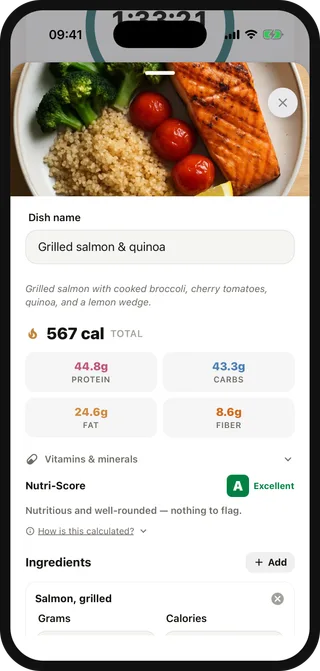
Kaelo Scan result screen: Calories, macros and Nutri-Score, editable in grams

Scan result

Calories, macros and Nutri-Score, editable in grams

Kaelo Type it screen: Describe a meal in plain words

Type it

Describe a meal in plain words

Kaelo Exercise screen: Log workouts in plain words too

Exercise

Log workouts in plain words too

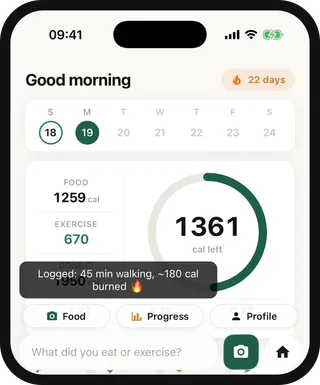
Kaelo Dashboard screen: Your day at a glance

Dashboard

Your day at a glance

Kaelo Health screen: Steps and active calories from Apple Health

Health

Steps and active calories from Apple Health

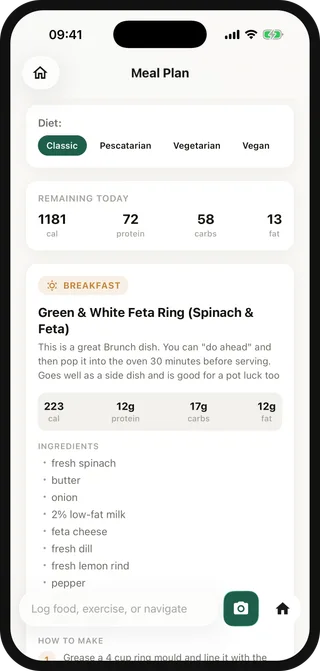
Kaelo Meal plan screen: A day of meals that fits your targets

Meal plan

A day of meals that fits your targets

Kaelo Fasting screen: Timer, eating window and history

Fasting

Timer, eating window and history

Kaelo Progress screen: Weekly trends and streaks

Progress

Weekly trends and streaks

← swipe →

About the app

What is Kaelo?

Kaelo is an AI calorie tracker and workout log for iPhone and Android. Instead of typing every ingredient into a database, you photograph your plate, scan a barcode or search a food, and Kaelo returns calories, protein, carbohydrate, fat and fibre in seconds. It also logs strength and cardio workouts, intermittent fasting, water and body weight, so the energy you eat and the energy you spend sit on one screen.

Every food is matched to USDA FoodData Central, the US government nutrient database used by dietitians and researchers, and every photo estimate shows its weight in grams so you can correct it. Your daily calorie and macro targets start from the Mifflin–St Jeor equation and then adapt to your logged intake and weight trend.

Calorie counting works because weight follows energy balance, not because any single food is magic. The point of a tracker is to make that balance visible with as little effort as possible, so you keep doing it long enough for it to matter. The sections below explain how Kaelo works and the terms you will run into, and every term links to a full guide with sources.
How it works

How does Kaelo count calories from a photo?

  1. Step 1

    Snap, scan or search

    Point the camera at a meal, scan a barcode, or search the food database. Kaelo identifies the foods, estimates the weight of each in grams and shows calories, protein, carbohydrate, fat and fibre.

  2. Step 2

    Check and adjust the grams

    Photo estimates are never perfect, so every ingredient shows an editable weight. Change 150 g of rice to 220 g and the macros update at once. Matching foods come from USDA FoodData Central.

  3. Step 3

    Watch your targets and trend

    Your dashboard shows calories left today, protein and other macros, your streak and your weight trend. Adaptive goals re-estimate your daily target from what you actually log and weigh.

Photo estimates have limits: a 2026 NIH test found photo-based calorie apps under-counted meals, particularly high-fat dishes. That is why Kaelo exposes the grams. Read how accurate AI calorie apps are and how to count calories from a photo for the full picture.

The basics

Calorie counting terms, explained

Tracking comes with its own vocabulary. Here is each term in two sentences, with a link to the long version. The full list is in our nutrition glossary.

Calories
A calorie on a food label is a kilocalorie, the energy in food. Weight goes down when you eat less energy than you burn and up when you eat more. Read the guide
BMR and TDEE
BMR is what your body burns at rest, around 60–70% of your day. TDEE adds movement, exercise and digestion, and is the number to build your target around. Read the guide
Calorie deficit
Eating about 300–500 kcal below your TDEE usually gives a steady loss of roughly 0.3–0.5 kg a week, without the muscle loss and rebound of crash diets. Read the guide
Macros
Protein and carbohydrate have 4 kcal per gram and fat has 9. Protein is the one worth tracking first: 1.2–1.6 g per kg of body weight while losing weight. Read the guide
Fibre and net carbs
Fibre is carbohydrate you don't fully digest. Net carbs subtract it from total carbs, a count used on low-carb diets rather than for plain calorie counting. Read the guide
Glycemic index
A 0–100 scale for how fast a food raises blood sugar. Glycemic load adds portion size, which is why a slice of watermelon is a smaller deal than its index suggests. Read the guide
Nutri-Score
An A–E grade of a food's nutritional quality per 100 g, where sugar, salt and saturated fat count against a food and fibre and protein count for it. Read the guide
Intermittent fasting
Eating only inside a time window, such as 16:8. It works mostly by helping some people eat less, so calories still decide the result. Read the guide

Library

Guides, calculators and comparisons

Free to read, sourced from the USDA, the NIH and published research, and written by the Kaelo Team under our editorial policy.

Guides

FAQ

Frequently asked questions

What is Kaelo?

Kaelo is an AI calorie tracker and workout log for iPhone and Android. You photograph a meal, scan a barcode or search a food, and it returns calories, protein, carbohydrate, fat and fibre. It also tracks workouts, fasting, water and weight, and syncs with Apple Health and Health Connect.

How does Kaelo's AI food scanner work?

Kaelo's AI identifies the foods in your photo, estimates the weight of each one in grams, then matches them to entries in USDA FoodData Central to get the nutrition. You can edit any food or weight afterwards, which matters because all photo-based calorie estimates have some error.

Where does Kaelo's nutrition data come from?

Foods come from USDA FoodData Central, the US government's nutrient database, including its Standard Reference, Foundation and Branded Foods datasets. Each food's calories and macros are tied to a published entry rather than crowd-sourced guesses.

How accurate is photo calorie counting?

Useful but not exact. Independent testing of photo-based calorie apps found they tend to under-count meals, especially fatty and mixed dishes. Kaelo shows grams per ingredient so you can correct estimates, and a barcode scan or a weighed portion is more accurate still.

Does Kaelo set my calorie target?

Yes. It calculates a starting target from your sex, age, height, weight, activity and goal using the Mifflin–St Jeor equation, then adaptive goals adjust it as your logged intake and weight trend show how your body actually responds.

Is Kaelo free?

Kaelo is free to download. The yearly plan includes a 7-day free trial, after which a subscription unlocks full use. Current prices are shown in the App Store and Google Play before you subscribe, and you can cancel any time.

Can I use Kaelo for muscle gain or macros?

Yes. Set a surplus or maintenance target, track protein, carbohydrate and fat against your goals, and log strength and cardio workouts in the same app. See the guides on protein and macros for suggested ranges.

Is my data private?

Your logs are tied to your account. You can export your data as PDF or CSV and delete your account in the app or at klyftig.co/kaelo/delete-account. The privacy policy lists exactly what is collected and why.

Reviews

Users love Kaelo

“I've tried every tracking app out there. Kaelo is the first one I've actually stuck with. The photo scan is scary accurate.”

Sarah K.

@sarah_eats

“Lost 12 kg in 4 months. The AI meal plans made it so easy — I just cook what it tells me and the macros work out perfectly.”

Marcus T.

@marcusfits

“Finally an app that doesn't feel like a chore. Snap, done, moving on. My whole family uses it now.”

Priya M.

@priyarunning

“The macro breakdown from photos is insane. I eat out a lot and this is the only app that handles it well.”

James O.

@jamesbulks

“I was skeptical but the AI got my home-cooked pasta right down to the sauce. Genuinely impressive.”

Elena R.

@elenalifts

“Clean interface, fast scanning, no bloat. Exactly what I needed. Worth every penny.”

Tom B.

@tomcycles

4.9 / 5

App Store rating

Highly rated on the App Store. Free to download — no credit card required.

Download on the App StoreGet it on Google Play

Get started free

Start your free trial today

Download free and start seeing real results in your first week.

Download on the App StoreGet it on Google Play

By downloading, you agree to our Terms and Privacy Policy. No commitment. Cancel anytime.